
为在 Express 应用中使用编写中间件
中间件 函数是可以访问应用请求-响应周期中的 请求对象 (req)、响应对象 (res) 和 next 函数的函数。next 函数是 Express 路由中的一个函数,当调用它时,会执行紧随当前中间件之后的中间件。
🌐 Middleware functions are functions that have access to the request object (req), the response object (res), and the next function in the application’s request-response cycle. The next function is a function in the Express router which, when invoked, executes the middleware succeeding the current middleware.
中间件函数可以执行以下任务:
🌐 Middleware functions can perform the following tasks:
- 执行任何代码。
- 对请求和响应对象进行修改。
- 结束请求-响应循环。
- 调用堆栈中的下一个中间件。
如果当前的中间件函数没有结束请求-响应周期,它必须调用 next() 将控制权传递给下一个中间件函数。否则,请求将会悬挂。
🌐 If the current middleware function does not end the request-response cycle, it must call next() to pass control to the next middleware function. Otherwise, the request will be left hanging.
下图显示了中间件函数调用的各个元素:
🌐 The following figure shows the elements of a middleware function call:
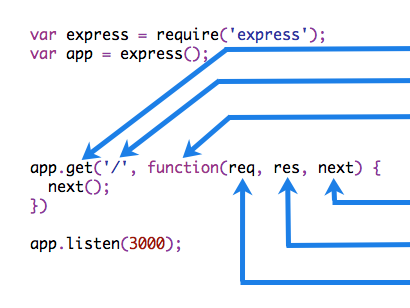 | 中间件函数适用的HTTP方法。 中间件函数适用的路径(路由)。 中间件函数。 传递给中间件函数的回调参数,按照惯例称为“next”。 HTTP 响应 参数传递给中间件函数,按照惯例称为“res”。 HTTP 请求 参数传递给中间件函数,按惯例称为“req”。 |
从 Express 5 开始,返回 Promise 的中间件函数在它们拒绝或抛出错误时会调用 next(value)。next 将会使用被拒绝的值或抛出的错误被调用。
🌐 Starting with Express 5, middleware functions that return a Promise will call next(value) when they reject or throw an error. next will be called with either the rejected value or the thrown Error.
示例
🌐 Example
这是一个简单的 “Hello World” Express 应用示例。本文的其余部分将定义并向应用添加三个中间件函数:一个名为 myLogger 的函数,用于打印一个简单的日志消息,一个名为 requestTime 的函数,用于显示 HTTP 请求的时间戳,以及一个名为 validateCookies 的函数,用于验证传入的 cookie。
🌐 Here is an example of a simple “Hello World” Express application.
The remainder of this article will define and add three middleware functions to the application:
one called myLogger that prints a simple log message, one called requestTime that
displays the timestamp of the HTTP request, and one called validateCookies that validates incoming cookies.
const express = require('express');const app = express();
app.get('/', (req, res) => {  res.send('Hello World!');});
app.listen(3000);import express from 'express';
const app = express();
app.get('/', (req, res) => { res.send('Hello World!');});
app.listen(3000);import express, { type Express, type Request, type Response } from 'express';
const app: Express = express();
app.get('/', (req: Request, res: Response) => { res.send('Hello World!');});
app.listen(3000);中间件函数 myLogger
🌐 Middleware function myLogger
这里有一个名为“myLogger”的中间件函数的简单示例。这个函数在请求通过它时只会打印“LOGGED”。该中间件函数被赋值给一个名为 myLogger 的变量。
🌐 Here is a simple example of a middleware function called “myLogger”. This function just prints
“LOGGED” when a request to the app passes through it. The middleware function is assigned to a
variable named myLogger.
const myLogger = function (req, res, next) { console.log('LOGGED'); next();};import { type Request, type Response, type NextFunction } from 'express';
const myLogger = function (req: Request, res: Response, next: NextFunction) { console.log('LOGGED'); next();};这里 myLogger 是单独定义的,而不是直接传递给 app.use(),因此 TypeScript 没有上下文来推断它的参数,需要显式地标注它们。你也可以将整个函数类型标注为 RequestHandler,它会为你标注 req、res 和 next。当中间件在 app.use() 调用中内联编写时,Express 会推断出这三个参数,因此不需要标注。
🌐 Here myLogger is defined on its own rather than passed directly to app.use(), so TypeScript has
no context to infer its parameters and they are annotated explicitly. You can instead type the whole
function as RequestHandler, which types req, res, and next for you. When the middleware is
written inline in the app.use() call, Express infers those three parameters and no annotations are
needed.
Caution
注意上面对 next() 的调用。调用此函数会触发应用中的下一个中间件函数。next() 函数不是 Node.js 或 Express API 的一部分,而是传递给中间件函数的第三个参数。next() 函数的名称可以是任何名称,但按照惯例,它总是命名为“next”。为了避免混淆,应始终使用此惯例。
🌐 Notice the call above to next(). Calling this function invokes the next middleware function in
the app. The next() function is not a part of the Node.js or Express API, but is the third
argument that is passed to the middleware function. The next() function could be named anything,
but by convention it is always named “next”. To avoid confusion, always use this convention.
要加载中间件函数,请调用 app.use(),并指定中间件函数。例如,以下代码在根路径(/)的路由之前加载 myLogger 中间件函数。
🌐 To load the middleware function, call app.use(), specifying the middleware function.
For example, the following code loads the myLogger middleware function before the route to the root path (/).
const express = require('express');const app = express();
const myLogger = function (req, res, next) {  console.log('LOGGED');  next();};
app.use(myLogger);
app.get('/', (req, res) => {  res.send('Hello World!');});
app.listen(3000);import express from 'express';
const app = express();
const myLogger = function (req, res, next) { console.log('LOGGED'); next();};
app.use(myLogger);
app.get('/', (req, res) => { res.send('Hello World!');});
app.listen(3000);import express, { type Express, type Request, type Response, type NextFunction } from 'express';
const app: Express = express();
const myLogger = function (req: Request, res: Response, next: NextFunction) { console.log('LOGGED'); next();};
app.use(myLogger);
app.get('/', (req: Request, res: Response) => { res.send('Hello World!');});
app.listen(3000);每当应用收到请求时,它会在终端上打印消息“LOGGED”。
🌐 Every time the app receives a request, it prints the message “LOGGED” to the terminal.
中间件加载的顺序很重要:先加载的中间件函数也会先执行。
🌐 The order of middleware loading is important: middleware functions that are loaded first are also executed first.
如果 myLogger 在根路径的路由之后加载,请求永远不会到达它,应用也不会打印“LOGGED”,因为根路径的路由处理程序会终止请求-响应周期。
🌐 If myLogger is loaded after the route to the root path, the request never reaches it and the app doesn’t print “LOGGED”, because the route handler of the root path terminates the request-response cycle.
中间件函数 myLogger 只是打印一条消息,然后通过调用 next() 函数将请求传递给堆栈中的下一个中间件函数。
🌐 The middleware function myLogger simply prints a message, then passes on the request to the next middleware function in the stack by calling the next() function.
中间件函数 requestTime
🌐 Middleware function requestTime
接下来,我们将创建一个名为“requestTime”的中间件函数,并向请求对象添加一个名为 requestTime 的属性。
🌐 Next, we’ll create a middleware function called “requestTime” and add a property called requestTime
to the request object.
Caution
因为中间件向 req 添加了一个属性,所以在 TypeScript 中使用 声明合并 扩展请求类型。在你的项目中包含的 .d.ts 文件中声明该属性(作为可选项,因为中间件可能不会对每个请求运行):
🌐 Because the middleware adds a property to req, extend the request type in TypeScript with
declaration merging. Declare
the property (as optional, since a middleware may not run for every request) in a .d.ts file that
is part of your project:
declare global {  namespace Express {    interface Request {      requestTime?: number;    }  }}
export {};
TypeScript 会自动识别该文件,因此除非你设置了一个不包含其位置的自定义 include,否则无需更改 tsconfig.json。请参阅 在 TypeScript 中扩展 API 以添加其他自定义属性和方法。
🌐 TypeScript picks up the file automatically, so no tsconfig.json change is needed unless you have
set a custom include that does not cover its location. See
Extending the API in TypeScript for
adding other custom properties and methods.
const requestTime = function (req, res, next) { req.requestTime = Date.now(); next();};import { type Request, type Response, type NextFunction } from 'express';
const requestTime = function (req: Request, res: Response, next: NextFunction) { req.requestTime = Date.now(); next();};该应用现在使用 requestTime 中间件函数。此外,根路径路由的回调函数使用了中间件函数添加到 req(请求对象)的属性。
🌐 The app now uses the requestTime middleware function. Also, the callback function of the root path route uses the property that the middleware function adds to req (the request object).
const express = require('express');const app = express();
const requestTime = function (req, res, next) {  req.requestTime = Date.now();  next();};
app.use(requestTime);
app.get('/', (req, res) => {  let responseText = 'Hello World!<br>';  responseText += `<small>Requested at: ${req.requestTime}</small>`;  res.send(responseText);});
app.listen(3000);import express from 'express';
const app = express();
const requestTime = function (req, res, next) { req.requestTime = Date.now(); next();};
app.use(requestTime);
app.get('/', (req, res) => { let responseText = 'Hello World!<br>'; responseText += `<small>Requested at: ${req.requestTime}</small>`; res.send(responseText);});
app.listen(3000);import express, { type Express, type Request, type Response, type NextFunction } from 'express';
const app: Express = express();
const requestTime = function (req: Request, res: Response, next: NextFunction) { req.requestTime = Date.now(); next();};
app.use(requestTime);
app.get('/', (req: Request, res: Response) => { let responseText = 'Hello World!<br>'; responseText += `<small>Requested at: ${req.requestTime}</small>`; res.send(responseText);});
app.listen(3000);当你向应用的根目录发出请求时,应用现在会在浏览器中显示你的请求时间戳。
🌐 When you make a request to the root of the app, the app now displays the timestamp of your request in the browser.
中间件函数 validateCookies
🌐 Middleware function validateCookies
最后,我们将创建一个中间件函数,用于验证传入的 cookie,如果 cookie 无效则发送 400 响应。
🌐 Finally, we’ll create a middleware function that validates incoming cookies and sends a 400 response if cookies are invalid.
这是一个示例函数,用于通过外部异步服务验证 cookies。
🌐 Here’s an example function that validates cookies with an external async service.
async function cookieValidator(cookies) { try { await externallyValidateCookie(cookies.testCookie); } catch { throw new Error('Invalid cookies'); }}async function cookieValidator(cookies: Record<string, string>) { try { await externallyValidateCookie(cookies.testCookie); } catch { throw new Error('Invalid cookies'); }}在这里,我们使用cookie-parser中间件从req对象解析传入的cookie,并将它们传递给我们的cookieValidator函数。validateCookies中间件返回一个Promise,当被拒绝时将自动触发我们的错误处理程序。
🌐 Here, we use the cookie-parser middleware to parse incoming cookies off the req object and pass them to our cookieValidator function. The validateCookies middleware returns a Promise that upon rejection will automatically trigger our error handler.
const express = require('express');const cookieParser = require('cookie-parser');const cookieValidator = require('./cookieValidator');
const app = express();
async function validateCookies(req, res, next) {  await cookieValidator(req.cookies);  next();}
app.use(cookieParser());
app.use(validateCookies);
// error handlerapp.use((err, req, res, next) => {  res.status(400).send(err.message);});
app.listen(3000);import express from 'express';import cookieParser from 'cookie-parser';import cookieValidator from './cookieValidator';
const app = express();
async function validateCookies(req, res, next) { await cookieValidator(req.cookies); next();}
app.use(cookieParser());
app.use(validateCookies);
// error handlerapp.use((err, req, res, next) => { res.status(400).send(err.message);});
app.listen(3000);import express, { type Express, type Request, type Response, type NextFunction } from 'express';import cookieParser from 'cookie-parser';import cookieValidator from './cookieValidator';
const app: Express = express();
async function validateCookies(req: Request, res: Response, next: NextFunction) { await cookieValidator(req.cookies); next();}
app.use(cookieParser());
app.use(validateCookies);
// error handlerapp.use((err: Error, req: Request, res: Response, next: NextFunction) => { res.status(400).send(err.message);});
app.listen(3000);Caution
注意 next() 是在 await cookieValidator(req.cookies) 之后被调用的。这确保了如果 cookieValidator 成功解决,堆栈中的下一个中间件将会被调用。如果你向 next() 函数传递任何东西(除了字符串 'route' 或 'router'),Express 会将当前请求视为错误,并会跳过任何剩余的非错误处理路由和中间件函数。
🌐 Note how next() is called after await cookieValidator(req.cookies). This ensures that if
cookieValidator resolves, the next middleware in the stack will get called. If you pass anything
to the next() function (except the string 'route' or 'router'), Express regards the current
request as being an error and will skip any remaining non-error handling routing and middleware
functions.
因为你可以访问请求对象、响应对象、堆栈中的下一个中间件函数以及整个 Node.js API,所以中间件函数的可能性是无限的。
🌐 Because you have access to the request object, the response object, the next middleware function in the stack, and the whole Node.js API, the possibilities with middleware functions are endless.
有关 Express 中间件的更多信息,请参见:使用 Express 中间件。
🌐 For more information about Express middleware, see: Using Express middleware.
可配置中间件
🌐 Configurable middleware
如果你需要你的中间件可以配置,请导出一个函数,该函数接受一个选项对象或其他参数,然后根据输入参数返回中间件实现。
🌐 If you need your middleware to be configurable, export a function which accepts an options object or other parameters, which, then returns the middleware implementation based on the input parameters.
module.exports = function (options) { return function (req, res, next) { // Implement the middleware function based on the options object next(); };};export default function (options) { return function (req, res, next) { // Implement the middleware function based on the options object next(); };}import { type Request, type Response, type NextFunction } from 'express';
export default function (options) { return function (req: Request, res: Response, next: NextFunction) { // Implement the middleware function based on the options object next(); };}中间件现在可以像下面显示的那样使用。
🌐 The middleware can now be used as shown below.
const mw = require('./my-middleware.cjs');
app.use(mw({ option1: '1', option2: '2' }));import mw from './my-middleware.mjs';
app.use(mw({ option1: '1', option2: '2' }));import mw from './my-middleware';
app.use(mw({ option1: '1', option2: '2' }));请参阅 cookie-session 和 compression 了解可配置中间件的示例。
🌐 Refer to cookie-session and compression for examples of configurable middleware.